<div align="center">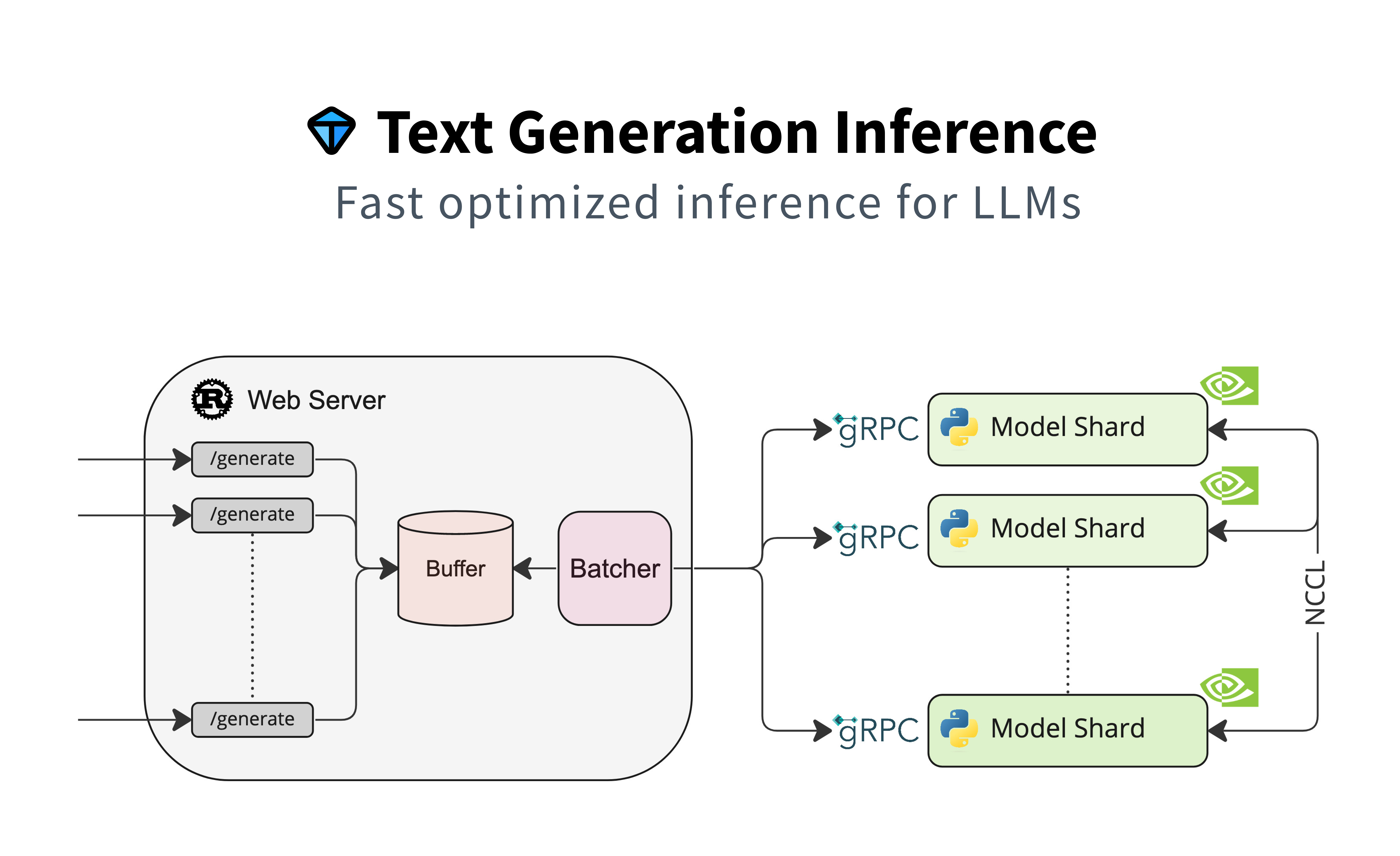# Text Generation Inference<a href="https://github.com/huggingface/text-generation-inference"> <img alt="GitHub Repo stars" src="https://img.shields.io/github/stars/huggingface/text-generation-inference?style=social"></a><a href="https://huggingface.github.io/text-generation-inference"> <img alt="Swagger API documentation" src="https://img.shields.io/badge/API-Swagger-informational"></a>A Rust, Python and gRPC server for text generation inference. Used in production at [HuggingFace](https://huggingface.co)to power Hugging Chat, the Inference API and Inference Endpoint.</div>## Table of contents- [Get Started](#get-started) - [API Documentation](#api-documentation) - [Using a private or gated model](#using-a-private-or-gated-model) - [A note on Shared Memory](#a-note-on-shared-memory-shm) - [Distributed Tracing](#distributed-tracing) - [Local Install](#local-install) - [CUDA Kernels](#cuda-kernels)- [Optimized architectures](#optimized-architectures)- [Run Falcon](#run-falcon) - [Run](#run) - [Quantization](#quantization)- [Develop](#develop)- [Testing](#testing)Text Generation Inference (TGI) is a toolkit for deploying and serving Large Language Models (LLMs). TGI enables high-performance text generation for the most popular open-source LLMs, including Llama, Falcon, StarCoder, BLOOM, GPT-NeoX, and [more](https://huggingface.co/docs/text-generation-inference/supported_models). TGI implements many features, such as:- Simple launcher to serve most popular LLMs- Production ready (distributed tracing with Open Telemetry, Prometheus metrics)- Tensor Parallelism for faster inference on multiple GPUs- Token streaming using Server-Sent Events (SSE)- Continuous batching of incoming requests for increased total throughput- Optimized transformers code for inference using [Flash Attention](https://github.com/HazyResearch/flash-attention) and [Paged Attention](https://github.com/vllm-project/vllm) on the most popular architectures- Quantization with [bitsandbytes](https://github.com/TimDettmers/bitsandbytes) and [GPT-Q](https://arxiv.org/abs/2210.17323)- [Safetensors](https://github.com/huggingface/safetensors) weight loading- Watermarking with [A Watermark for Large Language Models](https://arxiv.org/abs/2301.10226)- Logits warper (temperature scaling, top-p, top-k, repetition penalty, more details see [transformers.LogitsProcessor](https://huggingface.co/docs/transformers/internal/generation_utils#transformers.LogitsProcessor))- Stop sequences- Log probabilities- Custom Prompt Generation: Easily generate text by providing custom prompts to guide the model's output- Fine-tuning Support: Utilize fine-tuned models for specific tasks to achieve higher accuracy and performance## Get Started### DockerFor a detailed starting guide, please see the [Quick Tour](https://huggingface.co/docs/text-generation-inference/quicktour). The easiest way of getting started is using the official Docker container:```shellmodel=tiiuae/falcon-7b-instructvolume=$PWD/data # share a volume with the Docker container to avoid downloading weights every rundocker run --gpus all --shm-size 1g -p 8080:80 -v $volume:/data ghcr.io/huggingface/text-generation-inference:1.1.0 --model-id $model```And then you can make requests like```bashcurl 127.0.0.1:8080/generate \ -X POST \ -d '{"inputs":"What is Deep Learning?","parameters":{"max_new_tokens":20}}' \ -H 'Content-Type: application/json'```**Note:** To use GPUs, you need to install the [NVIDIA Container Toolkit](https://docs.nvidia.com/datacenter/cloud-native/container-toolkit/install-guide.html). We also recommend using NVIDIA drivers with CUDA version 11.8 or higher. For running the Docker container on a machine with no GPUs or CUDA support, it is enough to remove the `--gpus all` flag and add `--disable-custom-kernels`, please note CPU is not the intended platform for this project, so performance might be subpar.To see all options to serve your models (in the [code](https://github.com/huggingface/text-generation-inference/blob/main/launcher/src/main.rs) or in the cli):```text-generation-launcher --help```### API documentationYou can consult the OpenAPI documentation of the `text-generation-inference` REST API using the `/docs` route.The Swagger UI is also available at: [https://huggingface.github.io/text-generation-inference](https://huggingface.github.io/text-generation-inference).### Using a private or gated modelYou have the option to utilize the `HUGGING_FACE_HUB_TOKEN` environment variable for configuring the token employed by`text-generation-inference`. This allows you to gain access to protected resources.For example, if you want to serve the gated Llama V2 model variants:1. Go to https://huggingface.co/settings/tokens2. Copy your cli READ token3. Export `HUGGING_FACE_HUB_TOKEN=<your cli READ token>`or with Docker:```shellmodel=meta-llama/Llama-2-7b-chat-hfvolume=$PWD/data # share a volume with the Docker container to avoid downloading weights every runtoken=<your cli READ token>docker run --gpus all --shm-size 1g -e HUGGING_FACE_HUB_TOKEN=$token -p 8080:80 -v $volume:/data ghcr.io/huggingface/text-generation-inference:1.1.0 --model-id $model```### A note on Shared Memory (shm)[`NCCL`](https://docs.nvidia.com/deeplearning/nccl/user-guide/docs/index.html) is a communication framework used by`PyTorch` to do distributed training/inference. `text-generation-inference` makeuse of `NCCL` to enable Tensor Parallelism to dramatically speed up inference for large language models.In order to share data between the different devices of a `NCCL` group, `NCCL` might fall back to using the host memory ifpeer-to-peer using NVLink or PCI is not possible.To allow the container to use 1G of Shared Memory and support SHM sharing, we add `--shm-size 1g` on the above command.If you are running `text-generation-inference` inside `Kubernetes`. You can also add Shared Memory to the container bycreating a volume with:```yaml- name: shm emptyDir: medium: Memory sizeLimit: 1Gi```and mounting it to `/dev/shm`.Finally, you can also disable SHM sharing by using the `NCCL_SHM_DISABLE=1` environment variable. However, note thatthis will impact performance.### Distributed Tracing`text-generation-inference` is instrumented with distributed tracing using OpenTelemetry. You can use this featureby setting the address to an OTLP collector with the `--otlp-endpoint` argument.### Local installYou can also opt to install `text-generation-inference` locally.First [install Rust](https://rustup.rs/) and create a Python virtual environment with at leastPython 3.9, e.g. using `conda`:```shellcurl --proto '=https' --tlsv1.2 -sSf https://sh.rustup.rs | shconda create -n text-generation-inference python=3.9conda activate text-generation-inference```You may also need to install Protoc.On Linux:```shellPROTOC_ZIP=protoc-21.12-linux-x86_64.zipcurl -OL https://github.com/protocolbuffers/protobuf/releases/download/v21.12/$PROTOC_ZIPsudo unzip -o $PROTOC_ZIP -d /usr/local bin/protocsudo unzip -o $PROTOC_ZIP -d /usr/local 'include/*'rm -f $PROTOC_ZIP```On MacOS, using Homebrew:```shellbrew install protobuf```Then run:```shellBUILD_EXTENSIONS=True make install # Install repository and HF/transformer fork with CUDA kernelsmake run-falcon-7b-instruct```**Note:** on some machines, you may also need the OpenSSL libraries and gcc. On Linux machines, run:```shellsudo apt-get install libssl-dev gcc -y```### CUDA KernelsThe custom CUDA kernels are only tested on NVIDIA A100s. If you have any installation or runtime issues, you can removethe kernels by using the `DISABLE_CUSTOM_KERNELS=True` environment variable.Be aware that the official Docker image has them enabled by default.## Optimized architecturesTGI works out of the box to serve optimized models in [this list](https://huggingface.co/docs/text-generation-inference/supported_models).Other architectures are supported on a best-effort basis using:`AutoModelForCausalLM.from_pretrained(<model>, device_map="auto")`or`AutoModelForSeq2SeqLM.from_pretrained(<model>, device_map="auto")`## Run Falcon### Run```shellmake run-falcon-7b-instruct```### QuantizationYou can also quantize the weights with bitsandbytes to reduce the VRAM requirement:```shellmake run-falcon-7b-instruct-quantize```4bit quantization is available using the [NF4 and FP4 data types from bitsandbytes](https://arxiv.org/pdf/2305.14314.pdf). It can be enabled by providing `--quantize bitsandbytes-nf4` or `--quantize bitsandbytes-fp4` as a command line argument to `text-generation-launcher`.## Develop```shellmake server-devmake router-dev```## Testing```shell# pythonmake python-server-testsmake python-client-tests# or both server and client testsmake python-tests# rust cargo testsmake rust-tests# integration testsmake integration-tests```